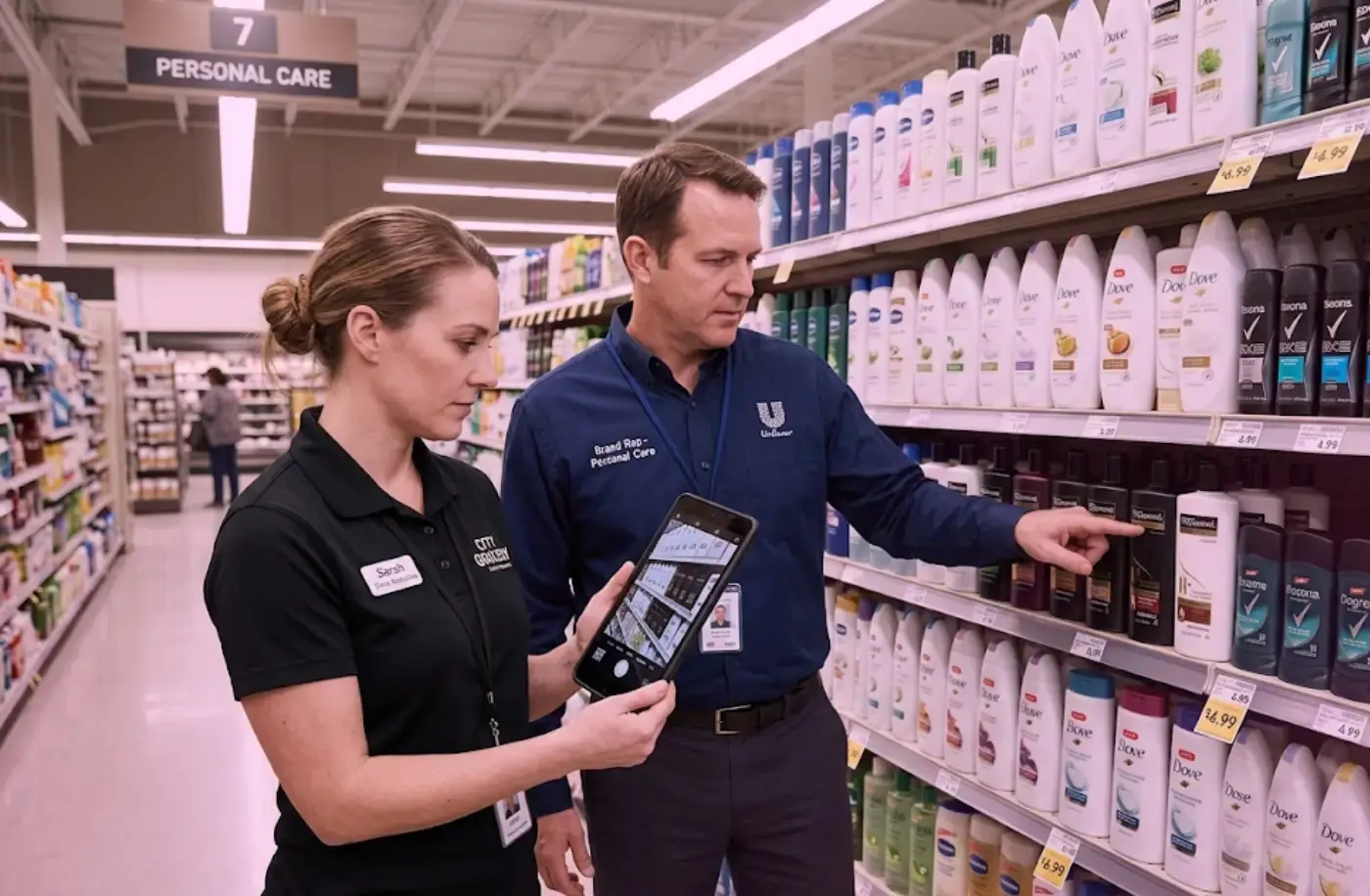
A field rep takes a photo of a shelf. Within 90 seconds, a list appears on their phone showing exactly which products are in the wrong position, which facing counts are off, which price tags are missing, and which competitor SKUs have moved into their space. They fix what's wrong before leaving the aisle.
That's computer vision working inside a retail execution workflow. This guide explains what the technology is, how it actually works under the hood, how it's used in retail today, and what it means commercially for CPG brand teams.
What is Computer Vision In Retail?
Computer vision is AI software that reads images the way a human eye does—identifying objects, understanding their position, and interpreting what it sees—but faster, more consistently, and at a scale no human team can match.
In retail, it's pointed at shelves. A camera or phone captures a shelf section, and the software reads every product it can see: what each one is, where it sits, how many facings are showing, whether the layout matches the approved planogram, and what the price labels say. It produces structured, actionable data from a photo.
What makes it different from a standard camera is that a standard camera records, but computer vision reads.
What Computer Vision Actually Does For A CPG Brand
In a retail execution context, computer vision does one primary job: it tells CPG brand teams what's actually on their shelves across thousands of stores—accurately, quickly, and without depending on what a rep happened to notice during a visit.
The specific outputs it produces include:
- Planogram compliance: which products are in the right position, which have drifted, which are missing entirely.
- Out-of-stock detection: which shelf slots are empty and which SKUs are absent.
- Pricing verification: whether price tags match expected values and whether any are missing.
- Share of shelf: how much physical space your brand occupies versus competitors in a given section.
- Competitive intelligence: what competitor products are on the shelf, where they're positioned, and whether they've taken space that belongs to your brand.
All of this from a single shelf photo, during the store visit, before the rep leaves the aisle.
How Computer Vision Actually Works—From Photo To Fix List
The mechanics of computer vision matter because they determine how accurate the system is, how fast it deploys, and why tools differ significantly from each other.
Step 1: Training the model
A computer vision model learns to recognize products by seeing them repeatedly across different conditions—different angles, different lighting, different shelf configurations.
The model is trained on a large library of labeled product images until it can reliably identify a product from its visual characteristics: packaging shape, color, label design, brand marks, and size.
This training step is where most deployment time goes. A model that hasn't seen your products before can't recognize them. Most computer vision vendors require clients to supply their own product images and attribute data—dimensions, UPCs, packaging variants—before the model can start working. That data collection and training process typically takes eight to sixteen weeks.
Vision Group's approach is different. Store360, our shelf intelligence platform, is pre-trained on a digital product library of over 1.3 million SKUs across CPG categories. For most clients, the model already knows their products before deployment begins. That's why most clients are live in under 30 days rather than months.
Book a walkthrough of Store360 here→
Step 2: Reading the shelf
Once trained, the model takes a new shelf image and runs two processes simultaneously.
First, it identifies every product it can see—SKU by SKU, position by position, facing count by facing count.
Second, it compares that read against the planogram assigned to that specific store and flags every deviation: wrong product in a slot, missing product, reduced facing count, pricing mismatch, competitor encroachment.
Step 3: Delivering the output
The findings reach the rep's phone within seconds, prioritized by commercial impact. The highest-value deviations surface first so the rep knows exactly where to start.
5 Places Retail Teams Are Using Computer Vision Right Now
Computer vision shows up in retail operations in four main places:
1. Shelf compliance checking during field visits
Field reps use computer vision-powered tools to take photographs of each shelf section during their store visit. The system compares each photo against the planogram for that store and returns a fix list before the rep moves to the next aisle.
This is the most commercially mature use case and the one delivering the most documented ROI for CPG brands today.
2. Out-of-stock monitoring
Computer vision is also used to flag empty shelf slots in real time, giving reps and store managers visibility into which products need restocking during the visit rather than through delayed inventory reports.
3. Promotional compliance tracking
Computer vision can read whether promotional displays, secondary placements, and point-of-sale materials are in place and match them against the promotional calendar.
If a display that should have been up for six weeks disappears in week three, the system flags it during the next store visit.
4. Competitive shelf intelligence
Because the system reads every product in the frame—not just the client's own SKUs—it captures competitor facing counts, positioning, and promotional placements as a byproduct of the normal compliance visit.
-
Capturing and converting a shelf layout into a working planogram
This is what Vision Group’s PicToPOG does.
Reps can photograph any shelf section—their own brand's set, a competitor's layout, or a store's existing configuration—and computer vision converts that photo into an editable planogram file in seconds.
The same technology that reads a shelf for compliance also reads it to produce a planning document.
Useful for building competitive reference sets before a line review, capturing a live reset to verify it matches the plan, or turning a retailer's existing layout into something a category team can actually work with.
Why CPG Teams Can't Afford To Ignore Computer Vision-Powered Technologies in 2026
Because the alternative—manual shelf audits—has structural limits that no amount of effort closes.
A field rep covering ten stores in a day scans thousands of SKU positions, but human attention degrades under that volume of repetitive visual input. By store six, the brain stops seeing and starts pattern-matching.
A facing count reduced from 2 to 2 on the highest-margin SKU doesn't register. A product shifted two positions left of its planogram assignment doesn't register. These deviations pass a visual check and surface in sales data weeks later.
The timing problem is separate. Even a careful manual audit produces data about the shelf as it was on visit day. A deviation that appeared Tuesday and shows up in a Thursday report has already cost two days of sales on a high-velocity SKU. That gap is structural—it's not fixed by better training or more motivated reps.
Computer vision catches what human attention misses and delivers the finding during the visit rather than in a report reviewed later. Those two changes are what drive its commercial impact.
What Happens To Your Operation When You Don't Adopt It
Three things happen when a CPG brand manages shelf execution without computer vision:
Compliance deviations persist longer
A facing count reduced by one, a product in the wrong position, a competitor taking allocated space—these get caught in a weekly report at best, a monthly review at worst.
Every day between the deviation appearing and getting corrected is sales exposure on a product that's either missing, wrong, or less visible than it should be.
Planning decisions get made on corrupted data
When the shelf consistently doesn't match the planogram, the sales data reflects a reality the plan never intended. A product that underperforms because it was consistently misplaced looks, in the data, like a product shoppers don't want.
That signal feeds the next assortment review and leads to cuts or space reductions that compound the problem.
Trade investment doesn't convert
A promotion that was supposed to run for six weeks but whose display drifted in week three costs the full trade budget and delivers a fraction of the expected return.
Without computer vision tracking promotional compliance across the campaign window, this is invisible until the post-promotional review.
What Changes Operationally When You Adopt Computer Vision
The gains are the direct inverse, with specific mechanics behind each one.
Compliance issues get corrected during the visit
The rep sees the deviation while standing in front of the shelf, and correction happens in minutes rather than days.
L'Oréal's retail execution team deployed Store360 across Walmart locations where out-of-stocks were a persistent problem. Moving from audit data that was weeks old to live shelf visibility during the visit gave reps the evidence they needed to drive store manager action on the spot—resulting in $50,000+ in replenishment orders across ten stores in two weeks.
Planning decisions start from accurate data
Execution data from every store visit feeds back into planogram design and assortment planning. When the data shows that a specific SKU is consistently out of position across 150 stores, that's a planogram design signal—not just a field behavior issue.
Promotional trade investment converts
Promotional compliance is tracked continuously across visits, not just confirmed at launch. Mid-campaign decay gets caught during the visit when it's still correctable, not in a debrief after the campaign window has closed.
Not All Computer Vision Tools Are The Same—Here's What Actually Matters
All computer vision tools for retail claim to do the same things. The differences that matter are:
Pre-trained vs client-trained models
Tools that require you to supply your own product data take months to deploy. Tools with pre-built product libraries deploy in weeks. This is the single biggest variable in how quickly a team goes from contract to first useful data.
Accuracy by category and store format
A system that's 97% accurate in a well-lit ambient grocery set may perform very differently in a convenience cooler with condensation or a frozen section with frost on the glass. Ask for accuracy data that matches your channel and category—not a general headline number.
What happens when there's no planogram on file
Most tools can only benchmark compliance against an existing planogram. A tool that can benchmark shelf presence against category norms and competitor positions without a reference planogram eliminates coverage gaps across stores where planogram files are outdated or missing.
How execution data connects to the rest of the workflow
A tool that produces compliance findings but keeps them in a standalone dashboard is solving half the problem. Execution data that feeds back into planogram adjustments and assortment decisions is what makes computer vision a strategic tool rather than just an operational one.
What Computer Vision Still Can't Do
Computer vision technology can't fix a planogram built on the wrong category strategy. It will surface commercial consequences faster—but the strategy problem still needs a person to solve it.
It can't close a structural out-of-stock caused by supply chain failure. A rep can't replenish a product that isn't in the building. And it can't guarantee reps act on what it surfaces. Adoption is an operational challenge that requires targets, accountability, and management reinforcement.
Accuracy also has limits in specific conditions—heavy frost on cooler doors, packaging that looks visually similar across SKUs in the same category, and products turned so far from the camera that label text isn't visible. These create recognition errors that still require human verification.
How Computer Vision Connects To The Rest Of The Retail Execution Workflow
Computer vision doesn't do its most valuable work in isolation. The data it produces at the shelf is most useful when it connects forward and backward in the planning-to-execution cycle.
To planogram design. When execution data shows that a specific SKU consistently drifts from its assigned position across hundreds of stores, that's feedback the next planogram should incorporate. A shelf designed around how stores actually behave holds compliance better than one designed around how they should behave in theory.
To assortment planning. When a product consistently underperforms on shelf—wrong position, low facing count, or frequently out of stock—that signal needs to reach the category manager building the next assortment, not just the field manager scheduling the next visit.
Store360 connects to Curate, Vision Group’s assortment simulation tool, for exactly this reason: execution evidence informs assortment simulation, so the next plan starts from what actually happened rather than what was assumed.
To use computer vision effectively in retail, you must run it as the data layer that connects what happens in stores back to every decision made upstream.
The question most CPG teams are asking in 2026
Computer vision in retail closes the gap between what a planogram says the shelf should look like and what it actually looks like across thousands of stores on any given day. It's been commercially viable at enterprise CPG scale for several years.
The question for most teams is no longer whether it works but how quickly to move and how deeply to connect it to the rest of the operation.
See Computer Vision Working In Your Stores
The technology in this article powers two tools your field team can use today:
If your problem is compliance accuracy during the store visit —
Store360 gives a field rep a complete SKU-level compliance read within 90 seconds of taking a shelf photo. Deviations are prioritized by commercial impact and delivered to their phone before they leave the aisle.
Most clients are live in under 30 days because Store360 is pre-trained on over 1.3 million SKUs—your products are already in the library.
L'Oréal's retail execution team used it to secure $50,000+ in replenishment orders across ten Walmart stores in two weeks.
And if your problem is capturing what's actually on a shelf and turning it into a working planogram —
PicToPOG converts a single shelf photo into an editable planogram file. Useful before a line review when you want a real-world reference set, after a reset to verify the shelf matches the plan, or when a retailer hands you a PDF and you need something your team can actually edit.
Both tools connect.
Execution data from Store360 feeds back into planogram planning so the next reset starts from what actually happened in stores—not from assumptions. The shelf photo becomes the data layer that connects field execution to every planning decision upstream.
Book a walkthrough of Vision Group’s retail execution platform to see both in a live store environment →
Computer Vision in Retail FAQ:
1. What is computer vision in retail?
Computer vision in retail is AI software that reads shelf photos and converts what it sees into structured, actionable data—which products are present, where each one is positioned, how many facings it has, whether the layout matches the planogram, and what the price tags say. A field rep takes a photo on their phone, and the system returns a compliance score and a prioritized fix list within 90 seconds. It replaces manual visual checking with automated, SKU-level shelf analysis delivered during the store visit.
2. How does computer vision work for shelf compliance in retail?
A computer vision model is trained on a large library of product images until it can reliably identify each SKU by its visual characteristics—packaging shape, label design, color, and brand marks. When a rep takes a shelf photo, the model identifies every visible product and compares its position, facing count, and presence against the planogram assigned to that specific store. Deviations are flagged immediately and sent to the rep's device before they leave the aisle.
3. What can computer vision detect on a retail shelf?
Computer vision detects planogram compliance deviations, out-of-stocks, pricing errors and missing price tags, promotional display compliance, share of shelf by brand, and competitive product presence including competitor facing counts and positioning. All of this from a single shelf photo during a normal store visit.
4. Why does computer vision accuracy vary between store formats?
Accuracy varies because the conditions affecting image quality vary. A well-lit ambient grocery shelf produces higher accuracy than a convenience store cooler door with condensation, a frozen section with frost, or a narrow aisle with low lighting. Accuracy is also affected by how many images of each product the model was trained on—newer SKUs with less training data are recognized less reliably than established ones. Always ask vendors for accuracy data specific to your channel and category.
5. What's the difference between computer vision and image recognition in retail?
Image recognition is the specific capability of identifying individual products from their visual appearance in a photo. Computer vision is the broader technology that encompasses image recognition but also includes position analysis, spatial understanding, and contextual interpretation—understanding not just what a product is, but where it sits, how many facings it has, and whether the overall shelf state is compliant. In practice the terms are often used interchangeably, but computer vision is the more accurate description of what full shelf compliance tools do.
6. Is computer vision in retail ready for large-scale CPG deployment?
For shelf compliance checking and out-of-stock detection, yes—it's production-grade and deployed at enterprise scale by CPG brands today. The main deployment variable is how long it takes to get the model recognizing your products: vendors that require client-supplied product data take significantly longer to deploy than vendors with pre-built product libraries. For use cases like shopper behavior analytics and demand forecasting from shelf data, the technology is capable but the operational infrastructure most CPG teams need to support it is still maturing.
7. How does computer vision connect to planogram compliance?
Computer vision is the technology that makes scalable planogram compliance checking possible. It reads the live shelf at the SKU level and compares it against the approved planogram for that specific store—identifying which products are in the wrong position, which are missing, and which have the wrong facing count. That reading happens during the store visit rather than in a report reviewed days later, which means compliance issues get corrected the same day they're detected rather than on the next scheduled visit.